
How To Play Split-Screen Co-op In Stardew Valley On The Nintendo Switch
Stardew Valley supports multiplayer on several platforms. PC supports online/LAN multiplayer and local split-screen; Nintendo Switch supports online multiplayer and two-player local split-screen. The setup steps below are specifically for one Switch console and separate compatible controllers.
How to Set Up Split-Screen Co-op on the Nintendo Switch
To create a new split-screen farm on Nintendo Switch:
* Instead of choosing “new game” on the title screen, choose ‘co-op’.
* Click the “host farm” button.
* Click the “host new farm” button.
Make sure there is at least one cabin for each player that will join you in the game. After this, get the option to select a profit margin. Also, choose if the Stardew Valley players that will join you will share one wallet with you or have their different wallet. While you can share a wallet or build or demolish cabins anytime in the game, you can’t change profit margins without save editing. With this done, your friends can join you on your brand-new Stardew Valley farm. It is also possible to have your friends join you on an existing farm. To do this, simply select to host the world and your friends (other players) can join you through a mutually selected or chosen platform.

How do I play split-screen co-op in Stardew Valley?
To start playing Stardew Valley switch split screen, follow the steps below:
* Start by creating or loading your save normally.
* After this, proceed by building a cabin for every player that will join you while still in the single-player mode.
* Connect a controller for each of your friends.
* Go to game options by opening the in-game menu.
* Scroll to the multiplayer section and choose “start local co-op”.
* Every new player joining you should press the “start” button on the connected controller.
That’s all, you are ready to start playing and enjoying the game together. While you can have four players on a single farm, you can only have two players in Stardew Valley Nintendo Switch local split-screen co-op.
Tips and Strategies for Playing Co-op Effectively
Every game has its tips and strategies and Stardew Valley is no exception. To the best out of your co-op farm in Stardew Valley, the following tips for playing co-op in Stardew Valley should be considered:
* Map
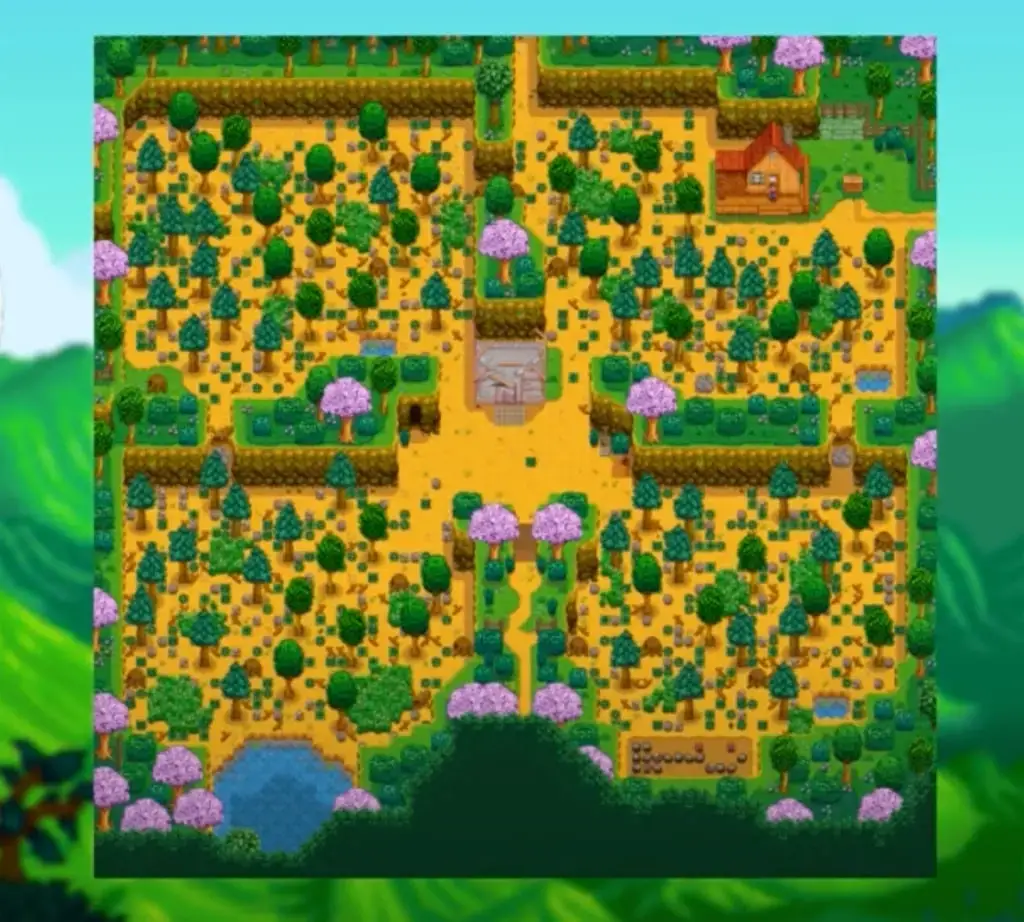
The four-corner map is the best when it comes to choosing multiplayer since it was designed for multiplayer mode though you can use it for single-player mode. The layout is made of four quadrants which are best for house individual cabins. Every quadrant provides a space for perks and a small pond from other Stardew Valley farm maps. This map also provides an easier layout and a bigger pond for you to draw water, thus assisting you in sharing responsibilities and separating your grounds as you work closely together.
- Profit margins
Profit margin is selected when a new farm is created and reduces qualifying sale proceeds to 75%, 50% or 25% of normal. Shop entries marked to use the farm profit margin—such as many seeds and basic ingredients—also become cheaper in the same direction. Unaffected merchant goods retain their normal price; lower profit margin does not make those purchases more expensive. - Cabins
Every joining farmhand needs an available cabin, but a farm does not automatically have three. Choose the Starting Cabins option when creating a multiplayer farm, or ask Robin to build additional cabins later; cabins can also be demolished. Keep one cabin for each farmhand you want to host.
Tips for dividing tasks and managing resources
Since you will be playing the game with your friends, it is important to know how to manage resources and divide tasks from the beginning or even before you start the game. This tip is best known in the following:
* Money and finances
Every player can share money and other finances in Stardew Valley as mentioned above. To manage resources – money, decide to equally share the money or split it amongst the players through individual wallets. You can set this up before starting a new game. It can also be done while in the game already via the town ledger.
- Game quest and progress
One of the beauties of this game is completing the different quests. You can divide tasks during quests by sharing the tasks to complete them faster. While you focus on this task, another will do the other. When the requirements for each quest are collected and met, you guys can now head over to the location. Although the progress of finishing a quest is largely dependent on each player, we recommend you and the other players keep up with each other by deciding to upgrade tools and collect recipes together.
Final Thought
Split-screen co-op on the Nintendo Switch has made it possible for you and your friends to play Stardew Valley together. So, give it a try by following this guide. It’s fun and adventurous. Nevertheless, following the tips on how to manage resources and divide tasks on the farm beforehand will solve possible challenges or disagreements.