Mastering Item Stowing in Stardew Valley for Nintendo Switch
Stardew Valley is a popular farming simulation game that can be played on various platforms, including the Nintendo Switch. One of the key features of the game is item stowing, which allows players to quickly put away items they are holding with the press of a button. In this article, we will provide a comprehensive guide on item stowing in Stardew Valley for Nintendo Switch, including a definition of item stowing, how to use it, how to turn it on/off, default settings, and tips and tricks to optimize gameplay.
What is Item Stowing in Stardew Valley?
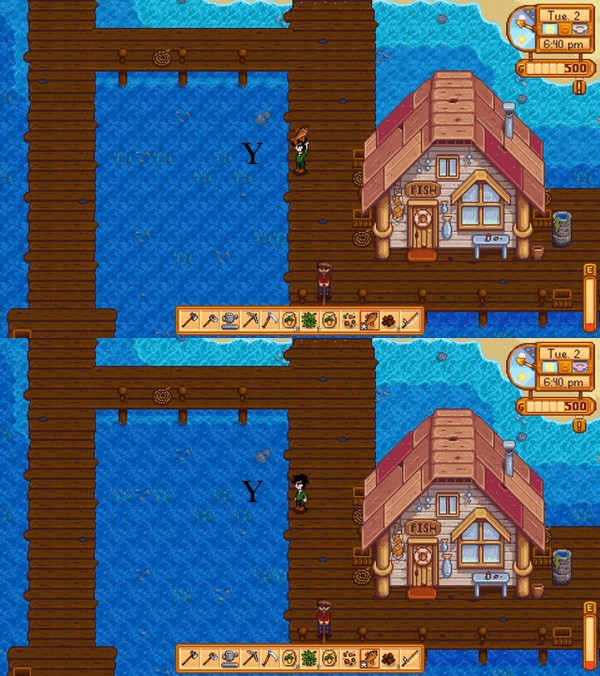
Item stowing changes only the character’s held-item state. When enabled, pressing Y (Use Tool) can stow or unstow the selected item so the character’s hands appear empty. The item remains in the same inventory slot; it is not transferred to a Chest, Shipping Bin or any other container.
How to Turn On/Off Item Stowing in Stardew Valley for Nintendo Switch
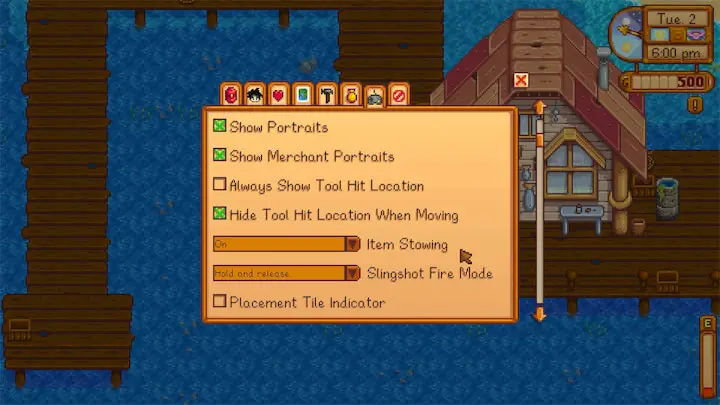
To turn on item stowing in Stardew Valley for Nintendo Switch, follow these steps:
- Start the game and navigate to the options menu.
- Under “General”
- Find the “Item Stowing” option and turn it on (using the left or right directional button).
To turn off item stowing in Stardew Valley for Nintendo Switch, simply follow the same steps and turn it off instead.
How to Use Item Stowing in Stardew Valley for Nintendo Switch
Item stowing can be useful when you want empty hands without changing the selected inventory slot:
- Press Y to use a tool or to stow/unstow the selected item when Item Stowing is enabled.
- Press A (Check/Do Action) to interact with an NPC and give the selected gift.
Default Settings for Item Stowing in Stardew Valley for Nintendo Switch
Item Stowing can be changed in the Options menu. Turning it off does not move gift-giving to Y: on Nintendo Switch, A remains Check/Do Action and the gift/interact button, while Y remains Use Tool.
Tips and Tricks for Item Stowing in Stardew Valley for Nintendo Switch
Here are some tips and tricks on how to optimize gameplay using item stowing in Stardew Valley for Nintendo Switch:
- Use stowing to free the character’s hands temporarily. To store or ship the item, interact with the Chest or Shipping Bin using A and use the relevant inventory interface.
- If you are playing in multiplayer mode, communicate with your teammates about how to use item stowing effectively to avoid confusion.
“Communication is key in multiplayer mode. Make sure you are on the same page with your teammates when it comes to using item stowing.”
Conclusion
On Nintendo Switch, remember the distinction: Y is Use Tool and can change the held-item state when stowing is enabled; A is Check/Do Action and handles NPC gifts and container interaction. Stowing never removes an item from inventory.